
 AI ERP with agents inside the systems you run
 AI phone and voice agents for real calls
 LLM.coPrivate, self-hosted LLM deployments
 Legal AI infrastructure for firms
 AI RFP discovery and response drafting
 Automatic.coBusiness process automation
 CyberAttack.aiThreat detection and defense
 Secure AI virtual data rooms
 DigitalSign.coAI-designed digital signage for any screen
 cstm.aiCustom AI hardware, software, and engineers
AI Chatbot Development: A Practical Guide to Building Custom AI Chatbots
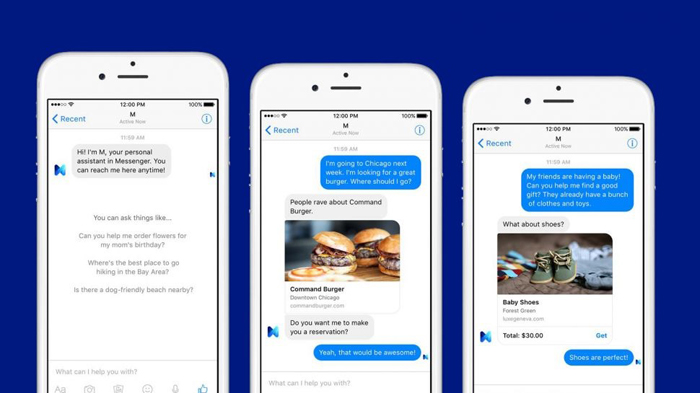
The word “chatbot” covers two completely different products in 2026. One is the scripted decision tree that has been apologizing on websites since 2016. The other is a language model wired into your documentation, your systems, and a set of actions it is allowed to take on a customer’s behalf. They share a chat bubble and nothing else.
This guide is about the second kind. AI chatbot development today means choosing a model, grounding it in content you trust, giving it tools, and putting guardrails around what it can say and do. The chat interface is the easy part. Everything behind it is the project.
Below we walk through how modern chatbots are actually built, how far you can get by vibe coding a prototype before you need engineers, what the work costs, and where AI chatbots reliably earn their keep. If you want the broader picture first, our AI development services overview covers the surrounding landscape.
What AI Chatbot Development Means Now
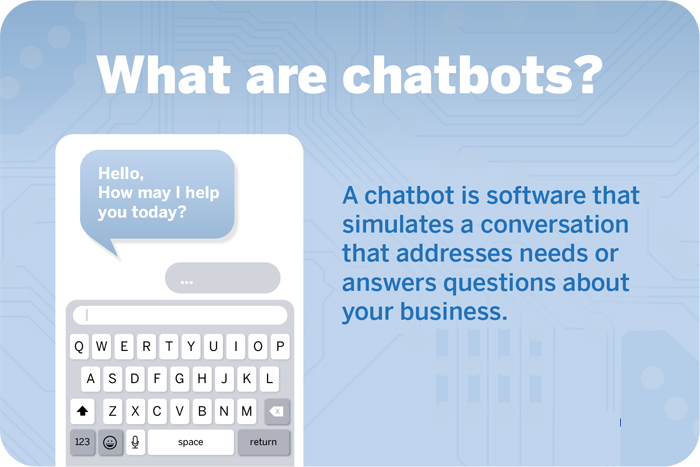
A chatbot is a software application that holds a conversation with a person and does something useful with it. The old generation matched keywords against a script. The current generation runs on large language models, which means it can read a question phrased in a way nobody anticipated and still understand the intent behind it.
That flexibility is the upgrade, and it is also the risk. A scripted bot fails loudly and predictably: it says “I didn’t catch that” and loops. A language model fails quietly and fluently. It will invent a return policy in complete sentences if you let it. Most of the engineering in modern AI chatbot development exists to prevent exactly that.
The Four Layers That Matter
Strip away the marketing and every serious chatbot is made of the same four layers.
- The model. The reasoning engine that turns messy human input into a response. Bigger is not automatically better, and the smallest model that passes your tests is usually the right answer.
- Retrieval. The layer that finds the right passage from your help center, product catalog, or policy library and hands it to the model before it answers. This is retrieval-augmented generation, and it is what separates a useful bot from a confident liar.
- Tools and actions. The functions the bot may call — look up an order, issue a refund under $50, book a slot, open a ticket. Without tools you have a search box with better manners.
- Guardrails and evaluation. The filters, escalation rules, and regression tests that keep behavior inside the lines as models and content change underneath you.
Teams that skip layers two and four ship fast and spend the next quarter apologizing. Teams that invest there ship a little slower and stop thinking about the bot at all, which is the actual goal.
Correct, In-Scope Answers by Chatbot Architecture
The jump that matters is not a bigger model — it is grounding. Connecting a mid-sized model to your own documentation does more for answer quality than any amount of prompt tinkering on an ungrounded bot.
The pattern in that chart holds across nearly every deployment we see. Moving from a scripted tree to a raw language model buys you comprehension but not accuracy. Grounding the same model in your own content is where answer quality jumps. Adding tools closes most of the remaining gap, because a lot of questions are not really questions — they are requests for the bot to go look something up in a live system.
Grounding Beats Model Size Almost Every Time
The most common mistake in AI chatbot development is treating model selection as the central decision. It rarely is. A mid-sized model with clean retrieval over accurate documentation will outperform a frontier model guessing from memory, and it will cost a fraction as much per conversation.
Retrieval also solves the freshness problem. Your return policy changes, your pricing changes, your shipping cutoffs change. A model trained months ago knows none of that. A retrieval layer pointed at a maintained knowledge base knows all of it the moment someone updates the source document.
Fine-tuning still has a place, mostly for tone, formatting, and narrow classification tasks. It is a poor tool for teaching facts. Our breakdown of fine-tuning versus RAG in enterprise AI walks through where each one earns its cost.
Practically, this means the first month of a chatbot project usually is not a model project at all. It is a content project: finding the twenty documents that answer eighty percent of inbound questions, fixing the ones that contradict each other, and deleting the ones that have been wrong since 2023.
Vibe Coding a Chatbot: How Far It Actually Gets You
Vibe coding — describing what you want to an AI coding assistant and shipping whatever it produces — has genuinely changed the front half of this work. A working chatbot prototype that reads your docs and answers questions in your voice is now an afternoon, not a sprint. Anyone on the team can build one. That is a real shift, and dismissing it makes you look like the people who dismissed spreadsheets.
What Vibe Coding Gets Right
Prototypes settle arguments. Instead of debating whether a chatbot could handle your onboarding questions, someone builds one on Tuesday and you watch it try. The prototype surfaces the real problems immediately: your documentation contradicts itself, half the questions need account data the bot cannot see, and the tone is wrong in a way nobody could have specified in advance.
It is also an excellent way to size the project. If a vibe-coded bot handles sixty percent of your test questions on day one, you are looking at a tuning problem. If it handles ten percent, you are looking at a data and integration problem, and you should budget accordingly. Modern AI coding agents make that first pass cheap enough that not doing it is the expensive choice.
Where the Vibes Run Out
The gap between a prototype and something you put in front of paying customers is almost entirely made of unglamorous work that AI assistants will happily skip unless you ask:
- Evaluation. A prototype is judged by whether it felt good in a demo. Production needs a test set of real questions with known-correct answers, run on every change.
- Authorization. The moment a bot can see account data, it needs to know whose account it is looking at and prove it. Generated code tends to assume a trusted caller.
- Data boundaries. What gets sent to a third-party model, what gets logged, what gets retained, and who can subpoena it. A privately hosted model is sometimes the only answer that survives a security review.
- Cost control. Long conversations and stuffed context windows get expensive quietly. Token budgeting belongs in the design, not in a panicked postmortem.
- Failure behavior. What the bot does when retrieval returns nothing, the API times out, or the user is furious. This is never in the prototype.
None of that argues against vibe coding. It argues for knowing which half of the project you are in. The same split shows up in AI-assisted website builds: the generated draft is a starting point with real value, and treating it as a finished system is how teams end up rewriting everything six weeks later.
From Chatbot to Agent: Giving It Hands
The clearest trend in AI chatbot development is bots that do things rather than describe things. A user does not want to be told where the billing page is. They want their card updated.
That means exposing a controlled set of functions the model can call, each with its own permissions, validation, and audit trail. The emerging standard for wiring those connections is the Model Context Protocol, and our notes on open-source MCP servers cover how that plumbing works in practice. For heavier orchestration, purpose-built AI agents handle multi-step tasks that a single chat turn cannot.
Design the action list conservatively. Read operations are cheap to allow and easy to audit. Write operations need limits — a refund ceiling, a confirmation step, a hard stop that hands off to a human. The bots that get pulled from production are almost always the ones that were allowed to do something irreversible on a bad inference.
Taken far enough, this stops being a chatbot conversation at all. We argued in AI web agents are the new UX standard that the chat window itself is transitional, and that goal-driven agents will absorb most of what navigation used to do. And once one bot cannot cover research, execution, and review on its own, the next step is usually multi-agent collaboration, where specialized agents divide the work.
Where AI Chatbots Actually Deflect Work
Chatbots are sold on total resolution rates, which is the wrong number to shop for. The useful number is per-intent: which specific requests can be closed end to end without a person, and which should be routed immediately.
Where AI Chatbots Actually Deflect Work
Deflection tracks how well an answer is documented, not how clever the model is. Anything that needs judgment, an apology, or a refund decision should route to a person quickly and gracefully.
The shape of that data has a practical consequence. Scope your first release around the top of the chart, not the bottom. Order status, account resets, and documented product questions are high volume, low ambiguity, and easy to verify — which means you can prove value in weeks and build the internal credibility to tackle harder intents later.
The bottom of the chart is not a failure. A bot that recognizes a billing dispute, collects the account number and the disputed charge, and hands a human a complete summary has still removed the worst five minutes of that call. Measure that as a win, not a deflection miss.
Customer Service
The anchor use case. A grounded bot answers documented questions instantly at 2 a.m., collects context before escalating, and never gets tired of the same question. Our AI customer support automation work focuses on the three jobs that pay off fastest: deflection, drafting replies for agents, and triage.
Sales and Lead Qualification
A chatbot can capture contact details, ask the disqualifying questions your reps hate asking, and route only real opportunities to a person. Done well it shortens the funnel. Done badly it interrogates people who wanted to read a pricing page, so keep the question count low and let visitors skip.
Internal Operations
The quietest win in AI chatbot development is the bot nobody outside the company ever sees. Point one at your internal wiki, your HR policies, or your runbooks and you remove a steady tax on senior people’s time. These deployments are also lower risk, since a wrong answer gets corrected by a colleague instead of a customer. Many teams pair this with broader AI workflow automation once the pattern proves out.
Order Processing and Payments
For commerce, a chatbot can assist with purchases, surface related products, and simplify payment flows. The integration work here is the real scope — the conversation is trivial next to correctly reading inventory and writing orders in real time, which is usually a JavaScript integration problem more than an AI one.
Guardrails, Evals, and the Work That Keeps You Out of the News
Every embarrassing chatbot story has the same root cause: a model was allowed to say or do something nobody tested for. The fix is unglamorous and well understood.
Build an eval set before you build the bot. Pull two hundred real questions from your support inbox, write the correct answer for each, and run the whole set on every change. Without this you are not improving a chatbot, you are redecorating it.
Filter both directions. Input filters catch prompt injection and abuse. Output filters catch unsafe, off-brand, or ungrounded claims before a user sees them. Our guide to LLM guardrails and token-level filtering gets into the mechanics.
Require citations internally. Even if you do not show sources to the user, make the model return which retrieved passage supported its answer. Answers with no supporting passage are the ones that get you in trouble, and they are trivially easy to catch and suppress once you ask for them.
Watch for drift. Your traffic changes, your content changes, and vendors update models underneath you without asking. Online drift monitoring turns a slow quality slide into an alert instead of a customer complaint.
Make escalation obvious and fast. Users forgive a bot that says “let me get someone.” They do not forgive a bot that traps them in a loop. Put the exit in every conversation.
What AI Chatbot Development Costs
Budgets vary enormously by integration depth, but the shape of the spend is remarkably consistent, and it surprises people who expected the money to go into AI.
Where an AI Chatbot Development Budget Actually Goes
Model work is the smallest line item on almost every AI chatbot development project. Cleaning up the content the bot reads and wiring it into real systems is where the hours go.
Two implications follow. First, a company with clean, current documentation and a decent API will pay meaningfully less than a competitor with the same headcount and a decade of contradictory PDFs, because most of the bill is content and integration work. Second, the ongoing line is real. A chatbot is a product with a maintenance cost, not a project with an end date.
On running costs, per-conversation inference is usually the smallest surprise and context bloat is the biggest. Cache aggressively, retrieve narrowly, and set hard budget ceilings in code so a runaway loop cannot quietly bill you overnight. The same discipline we describe in custom AI software development applies directly here.
Build, Buy, or Blend
Off-the-shelf chatbot platforms are a legitimate answer, particularly for standard support deflection on a standard help center. You get an interface, analytics, and a handoff flow without hiring anyone.
Custom AI chatbot development starts to win when one of three things is true: your data cannot leave your environment, your workflows are unusual enough that the platform fights you, or the bot needs to take actions in systems the vendor has never heard of. Our framework for build, buy, or integrate decisions applies cleanly to chatbots.
Blended is the common landing spot. Use a platform for the widget, routing, and reporting, and build the retrieval and action layers yourself as a service the platform calls. That keeps the parts that differentiate you under your control and the commodity parts on someone else’s roadmap. If the conversational surface needs to be fully yours, custom LLM application development is the path.
Industries Putting AI Chatbots to Work
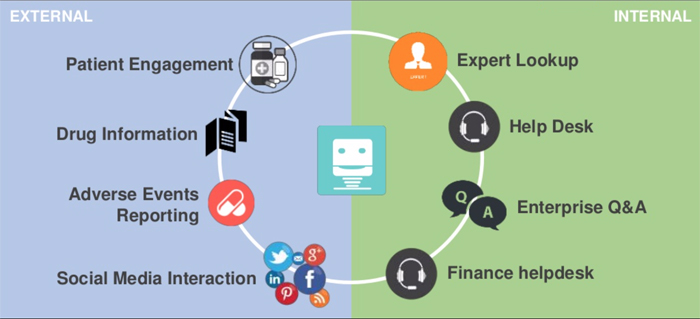
Adoption is broad now, but the maturity varies a lot by sector, largely because the regulatory ceiling varies.
E-Commerce
E-commerce was the first real proving ground and remains the clearest fit. Order status, sizing, returns, and stock questions are high volume, well documented, and verifiable against live systems. The bots that work here are tightly integrated with the order system; the ones that fail are pointed at an FAQ page and asked to improvise.
Medicine and Healthcare
Clinicians lose a meaningful share of their week to administrative work — research has put it at roughly one-sixth of working hours. Intake, triage, scheduling, and documentation lookup are where healthcare chatbots earn their place. Clinical advice is where they stop, and the guardrail enforcing that boundary is the most important component in the system.
Financial Services
Financial chatbots handle balances, transaction history, card controls, and routine servicing around the clock. Bank of America’s Erica is the long-running example, and most large banks now run something comparable. The interesting engineering is not the conversation — it is the authentication and audit trail behind every request.
Human Resources
Benefits questions, PTO policy, onboarding steps, and payroll dates are asked constantly and answered identically. An HR chatbot grounded in current policy documents removes that load, and it is a comparatively safe first deployment because the audience is internal and forgiving.
Logistics
Real-time shipment visibility is the whole product. Customers want a tracking answer without a phone queue, and carriers have exposed the APIs to make that a solved integration. UPS and similar carrier assistants have made this the baseline expectation rather than a differentiator.
Real Estate
Response speed decides who wins the lead. A chatbot that qualifies interest, answers property questions, and books a showing at 11 p.m. captures inquiries that would otherwise go to whoever calls back first the next morning.
B2B
B2B buyers are specialists, which makes generic bots useless and grounded bots valuable. A chatbot with retrieval over technical documentation, spec sheets, and integration guides can answer questions a generalist SDR cannot, at any hour, in any timezone. It also serves businesses of every size — the build scales down as well as it scales up.
Scoping the Right Chatbot for Your Business
Before anyone writes code, three decisions determine most of the outcome.
1. Decide What It Is Allowed to Know
Inventory the content the bot will answer from and be ruthless about accuracy. Contradictory documents produce contradictory answers, and no amount of prompting fixes a source of truth that is not true. This audit is tedious and it is the highest-leverage week of the project.
2. Decide What It Is Allowed to Do
List every action, then split it into read, write-with-limits, and never. Attach the escalation rule to each one now, while it is a cheap conversation, rather than after an incident.
3. Decide How It Should Sound
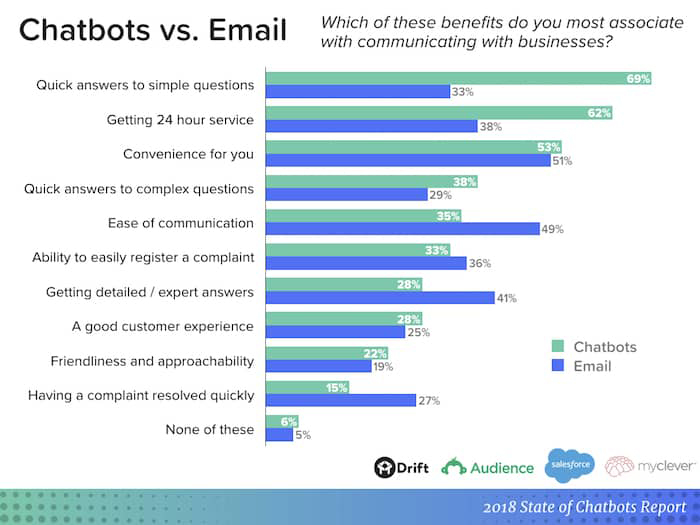
Personality is not decoration. A bot that oversells makes people distrust it; a bot that admits uncertainty and offers a human earns patience. Statista has found that a substantial share of consumers rate chatbot interactions as unsatisfactory, and the complaints cluster around unhelpfulness and confusion rather than tone. Design for “knows its limits” over “sounds human.”
A Practical Rollout Plan
- Weeks 1–2: pick one intent and instrument it. Choose a single high-volume request and measure today’s baseline — volume, handle time, and resolution rate. Without a baseline you cannot prove anything later.
- Weeks 2–3: build the eval set. Two hundred real questions with correct answers, pulled from actual transcripts. This is your definition of done.
- Weeks 3–5: fix the content. Correct, consolidate, and delete. Most teams find their documentation is worse than they believed.
- Weeks 5–7: build retrieval and the first tool. One read-only integration. Resist the urge to add three more.
- Weeks 7–9: internal pilot. Let your support team use it as an assistant before any customer sees it. They will find failure modes no eval set catches.
- Weeks 9–12: limited launch with a visible exit. Ten percent of traffic, obvious human handoff, transcripts reviewed daily.
- Ongoing: review, expand, repeat. Add the next intent only once the current one holds its numbers for a month.
Twelve weeks is a realistic first milestone for a scoped deployment with cooperative data. Projects that try to launch across every intent at once take longer and usually get switched off.
Conclusion
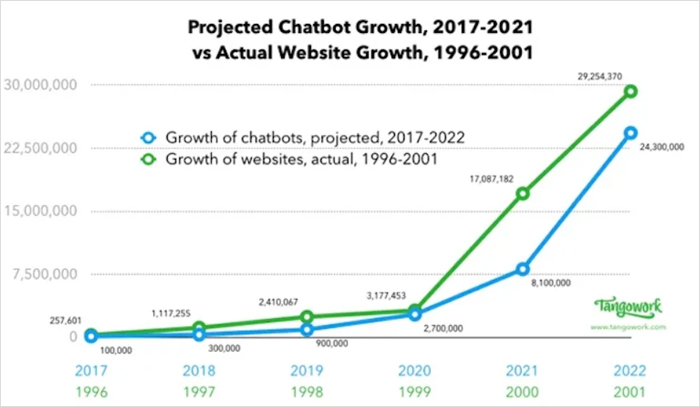
AI chatbot development has stopped being a novelty project and become ordinary product engineering with an unusual failure mode. The teams that do it well are not the ones with the biggest model. They are the ones with clean content, narrow permissions, a real eval set, and an honest escalation path.
Start with one intent you can measure. Ground the model in documentation you trust. Give it the smallest set of actions that makes it useful, and test every change against real questions. Let a vibe-coded prototype tell you how hard the problem is before you commit a budget to it — then build the unglamorous half properly.
If you would rather not learn those lessons on your own customers, our team builds and integrates production chatbots end to end. Get in touch and we will scope it with you, or explore our full range of AI development services to see where a chatbot fits alongside the rest of your stack.
